

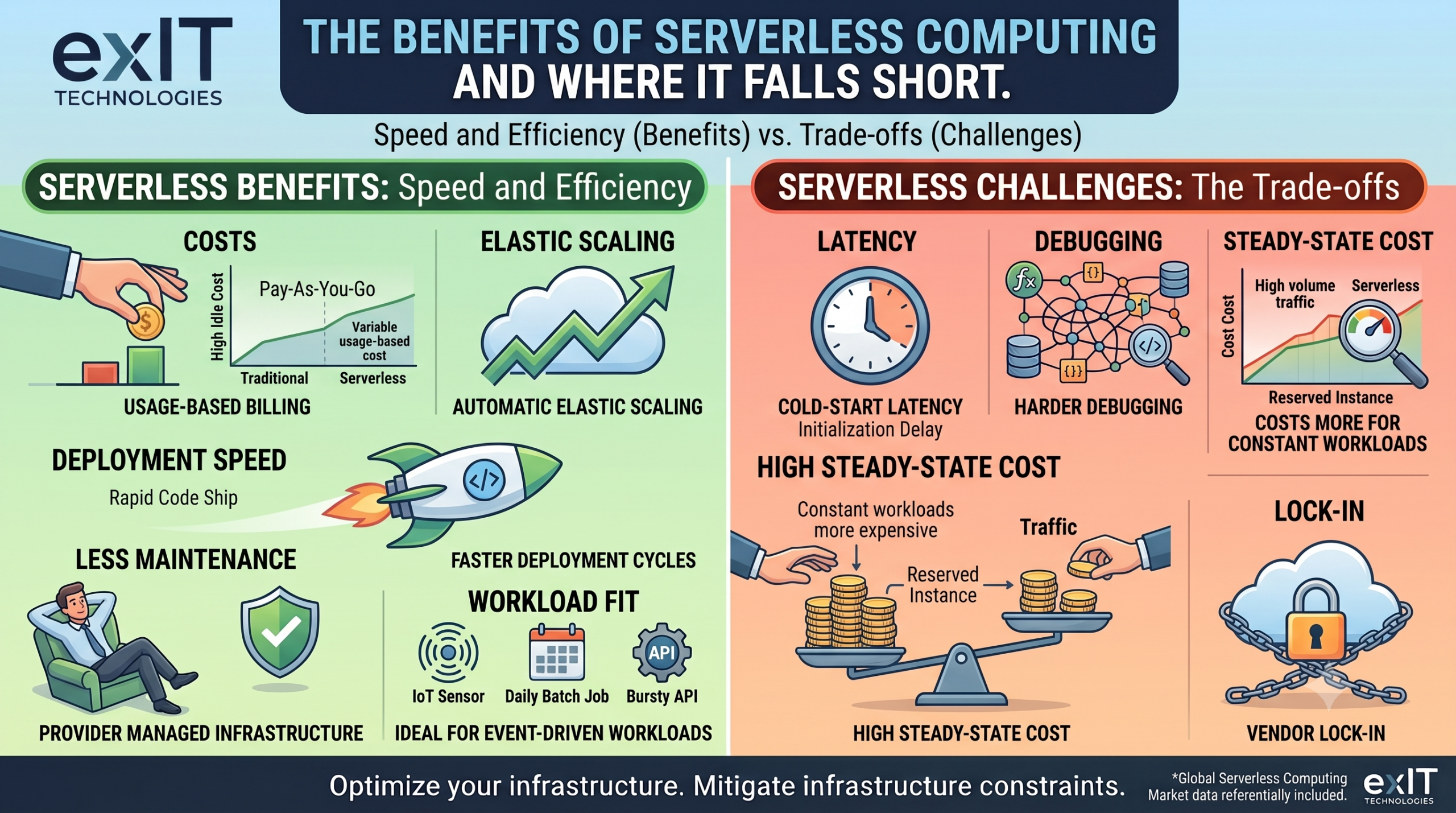
Every serverless benefit you’ll read about, elastic scaling, lower idle cost, faster deployment, comes from the same root decision: you’re trading control over infrastructure for speed of development.
To make the right decision about serverless computing, you need to start with what it actually is. From there, you can compare the benefits that hold up under real workloads, and the trade-offs that show up after the migration, once you’re already locked in.
Fast Facts: What You Need to Know Serverless Computing
- Serverless computing means the cloud provider manages server provisioning, scaling, and maintenance. The customer manages code and only pays for execution time.
- There are three main categories: Function-as-a-Service (FaaS), Backend-as-a-Service (BaaS), and managed container-based serverless platforms.
- The core benefits are usage-based billing, automatic scaling, and faster deployment cycles, since developers deploy functions instead of provisioning environments.
- The core trade-offs are cold-start latency, harder debugging, and vendor lock-in, because your application logic becomes tightly coupled to one provider’s runtime.
- Serverless computing fits variable, event-driven workloads well. It doesn’t fit constant, high-throughput workloads as well, because dedicated compute is often cheaper.
What Exactly Is Serverless Computing?
Serverless computing is a cloud execution model where a provider allocates compute resources on demand, runs your code, and then deallocates those resources when the job finishes.
You write functions or backend logic. The provider decides where that code runs, how many instances it needs, and when to shut them down.
The name is a misnomer in the literal sense. Physical and virtual servers still process every request. What’s actually gone is your visibility into them, and your responsibility for managing them.
This differs from Infrastructure-as-a-Service (IaaS), where you provision and manage virtual machines directly, and from Platform-as-a-Service (PaaS), where you manage an application on infrastructure that’s partially abstracted but still persistently running. Serverless takes it a step further: nothing runs unless a request or event triggers it.
The 3 Types of Serverless Computing
- Function-as-a-Service (FaaS): This is the model most people mean when they say “serverless.” Platforms like AWS Lambda, Google Cloud Functions, Cloudflare Workers, and Azure Functions run individual functions in response to triggers, an HTTP request, a file upload, a queue message, and bill by execution time and memory allocated.
- Backend-as-a-Service (BaaS): This version covers managed backend components you’d otherwise build yourself: authentication, databases, file storage, push notifications. You call an API instead of standing up and maintaining that service. Firebase and AWS Amplify offer services in this category.
- Serverless containers: Platforms like Azure Container Apps, AWS Fargate, and Google Cloud Run let you deploy containerized applications without managing the underlying cluster. It combines the packaging flexibility of containers with the operational hands-off model of serverless.
Most production serverless architectures combine all three, using FaaS for event-driven logic, BaaS for common backend services, and containers for anything that needs a longer runtime or a custom environment.
5 Biggest Benefits Of Serverless Computing
In the simplest terms, the benefits are reduced cost and less maintenance, but it’s worth digging a bit deeper.
- You stop paying for idle capacity. In a traditional server model, you provision for peak load and pay for that capacity around the clock, even at 2 a.m. when traffic is a fraction of the peak. Serverless platforms bill by actual execution, often down to the millisecond.
- Scaling stops being a capacity-planning exercise. A serverless platform spins up as many instances of a function as concurrent demand requires, then spins them back down. You don’t forecast traffic and pre-provision for it. You don’t get an off-hour call because a launch went viral and your fixed server pool couldn’t keep up.
- Deployment cycles compress. Since there’s no server to provision, patch, or configure before shipping code, teams can push individual functions independently instead of redeploying a monolith. This is a large part of why serverless adoption tracks so closely with microservices adoption. The market reflects that pace: global serverless computing market size was estimated at $24.51 billion in 2024 and is projected to reach $52.13 billion by 2030.
- Operational overhead drops for the infrastructure team. No OS patching, no capacity monitoring, no server fleet to keep current. That doesn’t mean operations work disappears. Instead, it shifts toward monitoring function performance, managing permissions, and controlling cost at the function level instead of the server level.
- Workloads with unpredictable or bursty traffic get cheaper and more resilient. For example, imagine a batch job that runs for ten minutes a day, an API that spikes during a product launch, an IoT pipeline that only fires when a sensor triggers. These are the textbook cases where serverless economics beat a dedicated server sitting idle the rest of the time.
5 Challenges That Serverless Doesn’t Help With
A serverless approach isn’t always the perfect fit.
- Cold starts are real, and they’re not going away entirely. When a function hasn’t run recently, the platform has to initialize a new execution environment before your code runs, adding latency. For latency-sensitive applications, that’s a problem.
- Debugging gets harder, not easier. A monolithic application fails in one place you can inspect directly. A serverless application is a distributed system of independently triggered functions, which means a failure can originate in a function, a trigger, a queue, or the interaction between all three. Local testing environments rarely replicate the production trigger behavior exactly.
- Long-running or steady-state workloads get more expensive, not less. Serverless pricing is optimized for burst and idle patterns. A workload that runs continuously at high volume will often cost more on a per-execution serverless model than it would on a reserved, dedicated instance. Match the workload to the pricing model, not the other way around.
- Vendor lock-in. Functions are written against a specific provider’s runtime, trigger model, and set of managed services. Migrating a serverless architecture between AWS, Google Cloud, and Azure typically means rewriting significant portions of the application.
- Security responsibility doesn’t disappear, it moves. The provider secures the underlying infrastructure. You’re still responsible for function-level permissions, secrets management, and the code itself. Overly broad Identity and Access Management (IAM) roles on individual functions are one of the more common serverless misconfigurations security teams find in audits.
The Migration To Serverless Infrastructure
Serverless computing is a specific one, suited to particular workload shapes: event-driven, bursty, loosely coupled, and tolerant of a few hundred milliseconds of cold-start variance.
What it also does, every time an organization commits to serverless at scale, is create a population of physical servers, on-prem racks, or reserved cloud hardware that the workload no longer needs.
Migrating workloads off dedicated infrastructure and onto a serverless model is one of the more common triggers for a hardware refresh or a full data center decommission, and that hardware doesn’t dispose of itself responsibly just because the workload moved to the cloud.
If a serverless migration on your roadmap is about to leave racks, drives, or an entire data center footprint behind, exIT Technologies’ data center decommissioning and IT asset disposition services handle the part of the migration that doesn’t show up in the architecture diagram.

 English
  German
  Spanish
  French
  Swedish
  Dutch
Dutch