

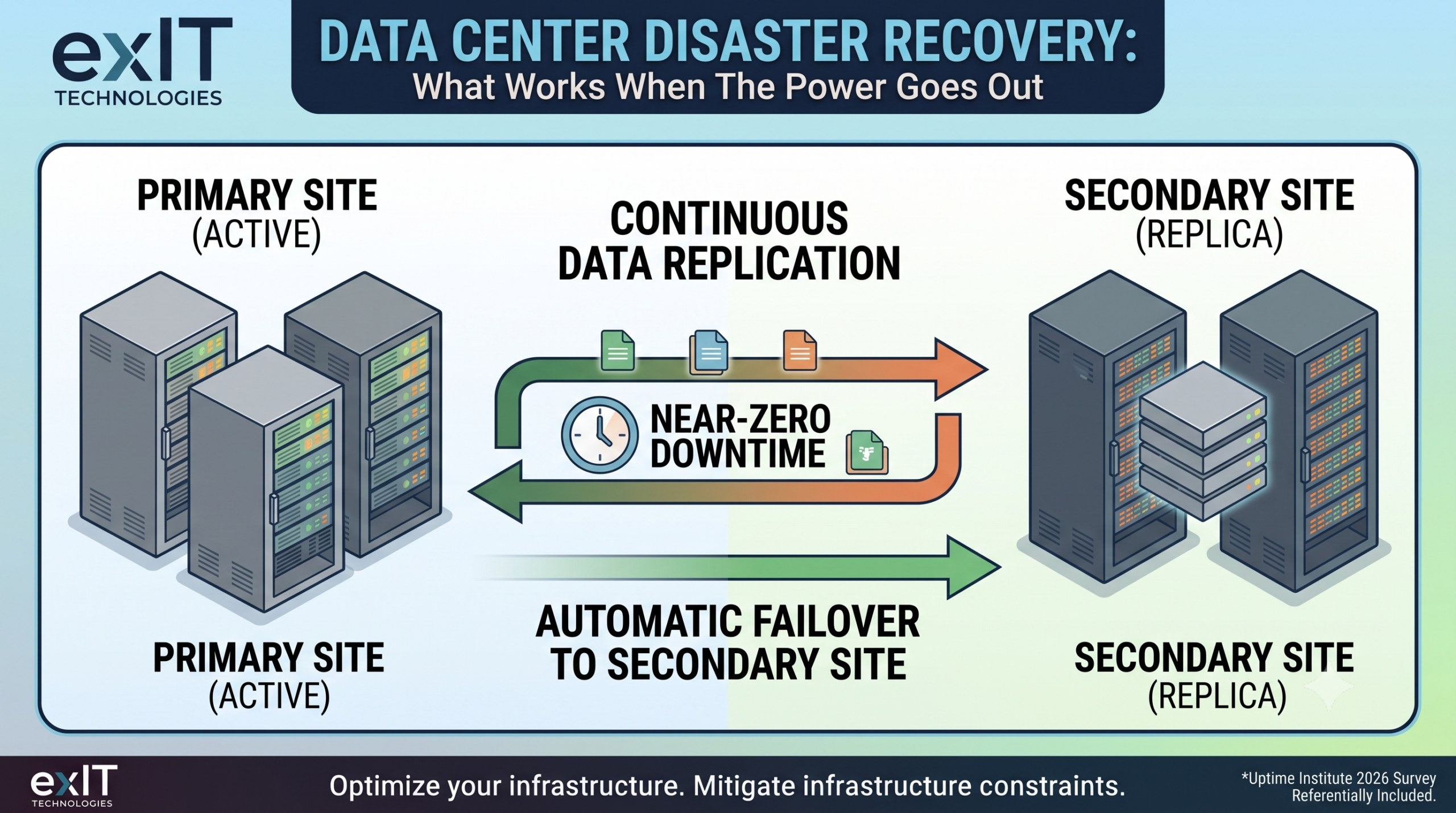
Your data center will experience an outage this year. The real question is what happens in the sixty seconds after it does.
Uptime Institute’s 2026 Annual Outage Analysis found that 57% of operators whose most recent major outage caused real damage put the cost above $100,000. One in five put it above $1 million. The source of these outages is increasingly coming from outside the walls of the data center entirely.
Disaster recovery plans today must do more than protect the building, the generator, and the UPS. A plan that only accounts for what happens inside your four walls is a plan that misses a growing share of what’s actually taking data centers down.
Fast Facts: What You Need to Know About Data Centers And Disaster Recovery
- Disaster recovery (DR) is a tested, documented system for restoring systems and data after a disruption.
- Two numbers drive every DR decision: Recovery Time Objective (how long you can be down) and Recovery Point Objective (how much data you can afford to lose).
- Backup site models fall into three tiers: hot, warm, and cold, each trading cost against recovery speed.
- Geographic separation between primary and secondary sites needs to reflect real regional risk beyond a line drawn on a map.
- Fiber, connectivity, and third-party cloud dependencies now cause a growing share of impactful outages.
What Is Data Center Disaster Recovery, And How Does It Actually Work?
Data center disaster recovery (DR) is the set of processes, systems, and infrastructure that restore your critical operations after a disruption. Disruption could be anything from a hurricane or a ransomware event, to a fiber cut three states away or a UPS failure.
It works in layers. The first layer is a business impact analysis: identifying which systems, applications, and data sets actually matter to revenue and operations. Rank them by how much damage their absence causes per hour.
The second layer is replication, keeping a current copy of critical data and systems somewhere your primary site’s failure can’t touch.
The third layer is failover, the mechanism that actually switches operations to that secondary location when the primary goes down.
None of this works without the fourth layer: testing. You’ll need a rigorous testing protocol in place to ensure the testing that looked great on paper is actually effective when your primary site has an outage.
The Two Numbers That Guide Every DR Decision
Before picking a strategy, you need two numbers, and most organizations discover they don’t actually know either one.
Recovery Time Objective (RTO): is the maximum time your business can tolerate being down. A hospital’s patient records system might have an RTO measured in minutes. A regional retailer’s internal reporting dashboard might tolerate a full day.
Recovery Point Objective (RPO): is the maximum amount of data you can afford to lose, measured backward from the moment of failure. An RPO of four hours means you’re comfortable rebuilding from a backup that’s four hours stale. An RPO of thirty seconds means you need continuous replication, not nightly backups.
The Disaster Recovery Strategies To Guide Your Planning
Every DR strategy comes down to a tradeoff between how fast you can recover and how much that speed costs to maintain. The three standard models:
| Model | Failover Time | Cost | Best Fit |
| Cold Site | Hours to days | Lowest | Low-RTO-tolerance workloads, archival systems |
| Warm Site | Minutes to hours | Moderate | Most production business applications |
| Hot Site | Seconds to minutes | Highest | Revenue-critical, customer-facing systems |
A cold site holds infrastructure but not live data. You’re restoring from backup after the fact, which is cheap but slow.
A warm site keeps a partially running environment with periodic data syncs, a middle ground that fits most production workloads.
A hot site runs a live, continuously replicated mirror of your primary environment. Failover happens automatically or near-automatically. The cost for operating this only makes sense for systems where downtime is measured in lost revenue per minute.
Geographic separation matters as much as the model you pick. A secondary site sixty miles from your primary can still lose power in the same regional grid event or flood in the same storm system. The right distance depends on your specific risk profile, not a flat rule, though most resilient architectures put meaningful distance between sites specifically so a single regional event can’t take out both.
4 Data Center Recovery Planning Best Practices
A DR plan earns its keep only when it’s tested, current, and built around real operational data rather than assumptions made two budget cycles ago.
- Test at least annually, and test the failure. Full-scale DR tests should run at minimum once a year. The better tests confirm the secondary site comes online, and they simulate the actual failure mode: a corrupted primary database, a partial network outage, a ransomware payload already inside the environment.
- Build runbooks so multiple team members can execute them. Your DR plan is not viable if only one person knows where all the pieces are. A real plan needs to be executable by multiple team members.
- Reassess RTO and RPO whenever the business changes. A fixed schedule is not the right approach. A new product launch, a new compliance obligation, or a shift to a new customer segment can change what “acceptable downtime” means overnight. That means a new DR request is required.
- Account for third-party and connectivity failure. You can’t only plan for infrastructure failure. Outages can come from outside your perimeter just as easily as within. Your plan needs to account for that and find multiple routes for redundancy.
The Part Most DR Plans Skip
Every DR test eventually surfaces the same uncomfortable finding: aging backup hardware sitting at a secondary site that hasn’t been refreshed since the plan was written.
Decommissioned failover servers, retired storage arrays, and old networking equipment from a secondary site carry the same data exposure as anything in your primary facility. They don’t get the same scrutiny because nobody built that step into the DR plan in the first place.
If your last DR test turned up hardware that’s ready for retirement, exIT Technologies’ data center decommissioning services handle the secure removal, sanitization, and disposition of that equipment with the same rigor your primary environment already gets. A resilient DR strategy shouldn’t create a hardware blind spot and security risks, so make sure you have a trusted partner to help you navigate hardware EOL.

 English
  German
  Spanish
  French
  Swedish
  Dutch
Dutch