

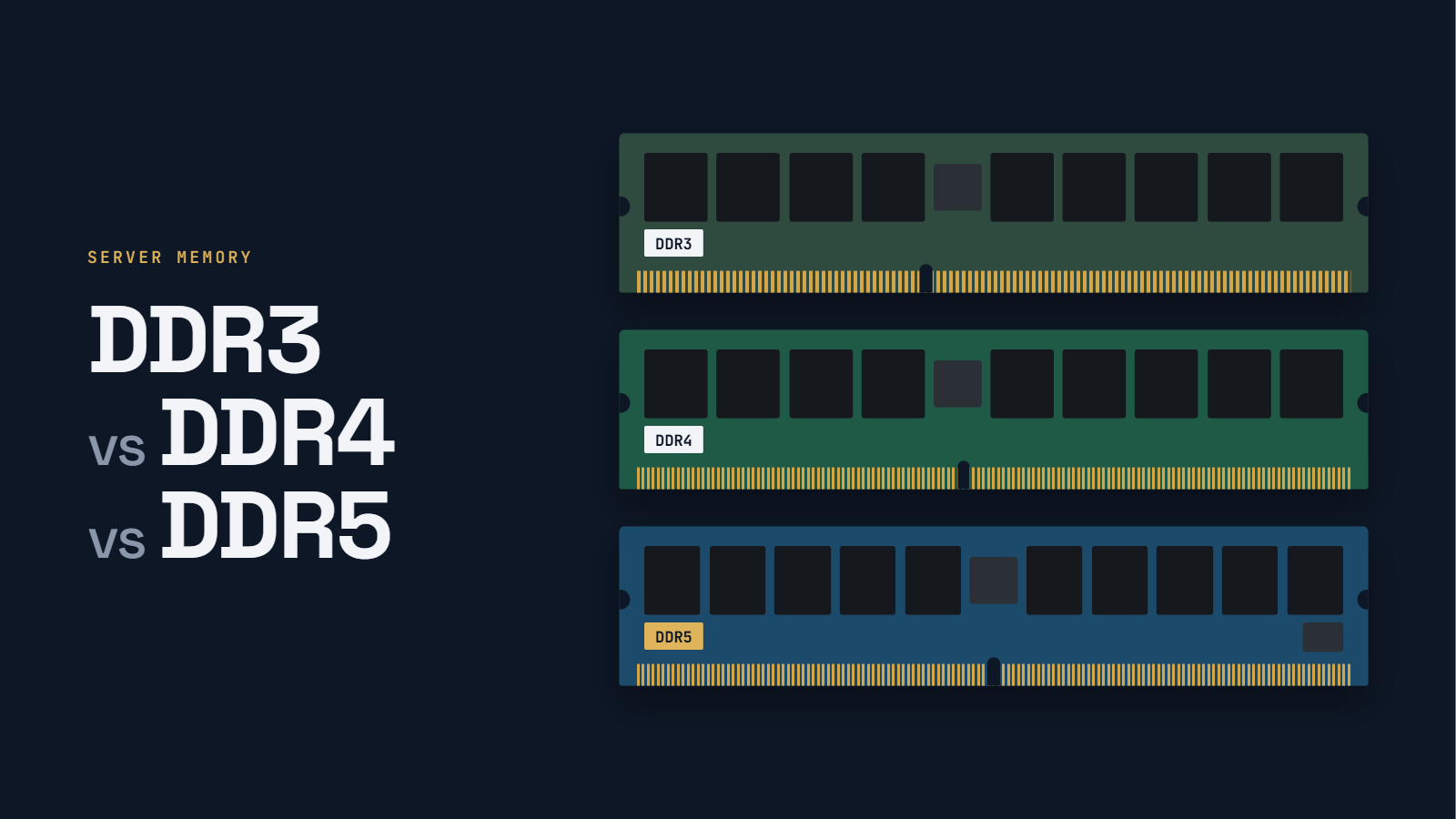
A server refresh can leave an IT team with hundreds of DIMMs that look similar but belong to different platforms. Even when the generation matches, a module can fail because of its rank, type or slot population rules. Knowing the difference between DDR3, DDR4 and DDR5 helps you identify the hardware, plan upgrades and avoid compatibility mistakes.
The short answer: DDR3 supports older servers, DDR4 is common across a large installed enterprise fleet, and DDR5 provides higher transfer rates and a new module architecture for recent systems. They are not interchangeable. A memory-generation upgrade requires a compatible processor and motherboard, not just different DIMMs.
| Generation | Typical server platforms | Main distinction |
| DDR3 | Xeon E5 v1/v2; PowerEdge R720; ProLiant Gen8 | Legacy platforms; lower bandwidth |
| DDR4 | Xeon E5 v3/v4 and Xeon Scalable 1st–3rd Gen; EPYC 7001–7003 | Widely deployed; mature RDIMM/LRDIMM ecosystem |
| DDR5 | Xeon Scalable 4th Gen+; EPYC 9004/9005 | Higher bandwidth; two subchannels and on-die ECC |
DDR3 vs DDR4 vs DDR5 server RAM specifications
Transfer rate is measured in megatransfers per second (MT/s), not MHz. The ranges below emphasize common server configurations rather than every rate ever defined by JEDEC memory standards. Actual speeds depend on the processor, server firmware, module type and number of DIMMs per channel.
| Specification | DDR3 | DDR4 | DDR5 |
| Representative server data rates | 1066–1866 MT/s on representative Xeon E5 v2 platforms | 1866–3200 MT/s | 4800–6400 MT/s on representative platforms |
| Peak bandwidth per 64-bit channel | 14.9 GB/s at DDR3-1866 | 25.6 GB/s at 3200 | 38.4 GB/s at 4800; 51.2 at 6400 |
| Nominal DRAM voltage | 1.5 V; DDR3L 1.35 V | 1.2 V | 1.1 V |
| Full-size DIMM pins | 240 | 288 | 288, differently keyed from DDR4 |
| Server module examples | RDIMM; LRDIMM where supported | RDIMM; LRDIMM; 3DS RDIMM. Persistent-memory products may use DDR4-era slots but are separate module types. | RDIMM; 3DS RDIMM and platform-specific variants |
| Data organization | One 64-bit channel | One 64-bit channel | Two 32-bit data subchannels (40 bits each on ECC RDIMMs, including check bits) |
| Burst length | 8 | 8 | 16 |
| Power regulation | Motherboard | Motherboard | On-module PMIC |
| Error correction | System-level ECC on ECC platforms | System-level ECC on ECC platforms | On-die ECC plus system-level ECC on ECC platforms |
| Illustrative CAS timing | DDR3-1600 CL11: 13.75 ns | DDR4-3200 CL22: 13.75 ns | DDR5-4800 CL40: 16.67 ns |
The CAS figures are examples, not a universal latency ranking. CAS delay in nanoseconds equals CL ÷ (MT/s ÷ 2) × 1,000. Real application latency also depends on memory-controller behavior, access patterns and the rest of the system.
How much more bandwidth does each generation provide?
Peak bandwidth for a 64-bit data path is MT/s × 8 bytes. DDR4-3200 provides 25.6 GB/s per channel, while DDR5-4800 provides 38.4 GB/s. DDR5-6400 reaches 51.2 GB/s. These numbers describe interface capacity, not measured application throughput.
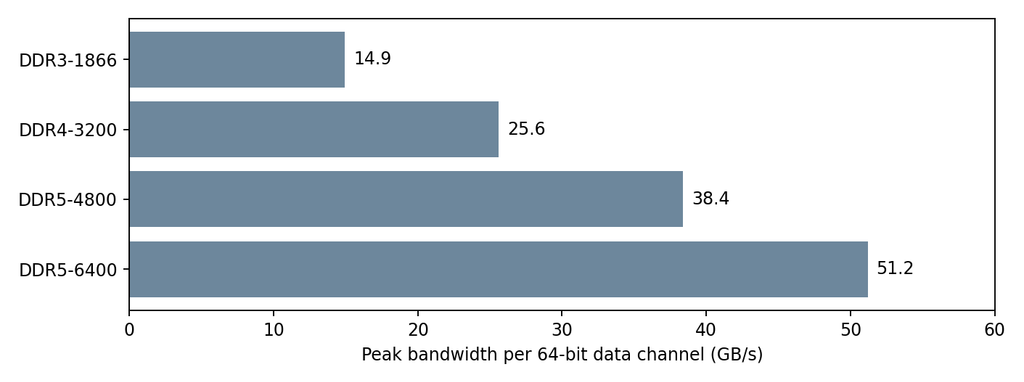
Figure: Theoretical peak bandwidth per 64-bit data channel. DDR3-1866 is the highest supported rate in the Intel Xeon E5 v2 server platform example.
What changed in enterprise server memory?
More bandwidth for high-core-count CPUs
Memory bandwidth becomes important when many cores compete to move data. DDR5 increases the available transfer rate and divides each module into two independent 32-bit subchannels, which can make transactions more efficient. A server still needs enough channels populated to realize its platform bandwidth.
For context, AMD EPYC 7763 has eight DDR4-3200 channels. Its theoretical 204.8 GB/s per socket works out to 3.2 GB/s for each of its 64 cores. EPYC 9654 has twelve DDR5-4800 channels, providing 460.8 GB/s per socket, or 4.8 GB/s for each of its 96 cores. This compares complete processor platforms, not RAM in isolation.
AMD lists the EPYC 9655 at up to 6400 MT/s and 12 memory channels. That is a maximum supported configuration, not a guarantee for every server or DIMM population. AMD’s EPYC 9005 partner specifications provide additional configuration context; verify the qualified speed in the OEM configuration guide before projecting bandwidth.
Lower voltage does not equal a fixed energy saving
Nominal DRAM voltage falls from 1.5 V on DDR3 to 1.2 V on DDR4 and 1.1 V on DDR5. DDR3L uses 1.35 V. Because dynamic switching power scales approximately with voltage squared when other factors stay constant, the change from 1.2 V to 1.1 V implies about 16% less switching energy for an otherwise comparable operation.
That calculation is not a claim that DDR5 DIMMs or entire servers use 16% less power. DDR5 modules run at different speeds and capacities, and their power-management integrated circuits (PMICs) also consume energy. Compare measured system power under representative workloads when evaluating a fleet refresh.
DDR5 on-die ECC is not a replacement for server ECC
Traditional server ECC uses check bits across the memory subsystem to detect and correct certain data errors. DDR5 adds on-die ECC within the DRAM chips to correct some internal cell errors before data leaves each chip. These protections operate at different levels.
An ordinary DDR5 module with on-die ECC is not automatically a system-ECC module. Enterprise buyers still need a CPU, motherboard and DIMMs that support the appropriate system-level ECC and reliability features. Continue to check the server vendor’s qualified-memory list and error-reporting capabilities.
Which servers support DDR3, DDR4 or DDR5?
| Generation | Processor examples | Server examples |
| DDR3 | Intel Xeon E5 v1/v2 | Dell PowerEdge R720; HPE ProLiant Gen8 |
| DDR4 | Intel Xeon E5 v3/v4; Xeon Scalable 1st–3rd Gen; AMD EPYC 7001–7003 | Dell PowerEdge R630/R730/R740/R750; HPE ProLiant Gen9/Gen10 |
| DDR5 | Intel Xeon Scalable 4th Gen and later; AMD EPYC 9004/9005 | Dell PowerEdge R760; HPE ProLiant Gen11 |
A server CPU contains the memory controller that determines its DDR generation. Matching that generation is only the first check. A system may also restrict module capacity, rank, RDIMM versus LRDIMM type and slot placement. Some configurations lower the operating rate as additional DIMMs are installed per channel. Consult the vendor’s supported memory configuration guide for platform-specific rules.
H2: How to read a server RAM label
A label can usually tell you the generation and several compatibility-critical details without powering on the server. Consider this illustrative label: “32GB 2Rx4 PC4-2666V-R”. Actual manufacturer labels vary, so always record the complete part number as well. If you’re unsure which memory is installed in a server or computer, see our guide on how to identify your RAM type for methods to check memory specifications using your operating system or physical module labels.
| Label segment | Meaning | Why it matters |
| 32GB | Capacity of this DIMM | Capacity and allowed module size must match the platform |
| 2Rx4 | Two ranks; x4 DRAM organization | Rank and chip organization affect platform limits and RAS modes |
| PC4 | DDR4 generation | PC3 = DDR3; PC4 = DDR4; PC5 = DDR5 |
| 2666V | DDR4-2666 speed grade; V is a JEDEC timing/speed-bin designation | Installed speed may be lower than the module rating |
| R | Registered DIMM (RDIMM) | RDIMMs and LRDIMMs usually cannot be mixed |
DDR3 example: PC3-12800R identifies a DDR3 registered DIMM rated for 12,800 MB/s, equivalent to DDR3-1600. PC3L indicates a DDR3L low-voltage module; check whether the platform supports its operating voltage.
DDR5 example: a label reading 64GB 2Rx4 PC5-4800B-R identifies a 64 GB, dual-rank x4 DDR5 registered DIMM with a 4800 MT/s grade. Label conventions vary by manufacturer, so verify the complete part number.
An RDIMM buffers command and address signals through a register to support reliable, high-capacity server configurations. An LRDIMM also reduces the electrical load presented by data signals, which can enable higher capacities on supported systems. Neither format is automatically a substitute for the other. Look for “R” or “L” in the module designation and verify the full part number against the OEM manual.
For an installed system, also record the server model, CPU generation and current slot population. A label alone cannot tell you whether a specific DIMM is qualified for that server.
A common compatibility mistake: the generation matches, but the DIMM still fails
A DDR4 label alone does not establish server compatibility. Dell’s PowerEdge R730 owner’s manual, for example, sets distinct RDIMM and LRDIMM population requirements. Installing a module of the correct generation but the wrong type, capacity or population pattern can prevent a server from booting or force a lower operating speed.
The practical check is generation first, then RDIMM/LRDIMM type, rank, capacity, CPU support and population order. Use the exact server service manual before moving modules between systems. This is also useful when sorting mixed DIMM lots from a decommissioned data room.
DDR4 remains installed even as manufacturing shifts
As of late 2026, DDR4 remains in many production server fleets even as major suppliers phase out portions of their DDR4 portfolios. Micron’s January 2025 product change notice clarified that a compute-segment end-of-life notice did not cover the embedded products listed in that notice.
Some non-compute parts were subsequently covered by a separate 2026 Micron notice. TrendForce’s October 2026 public bulletin confirms that suppliers continue phasing out DDR4; its January 2026 industry analysis also describes suppliers’ transition plans. Because lifecycle decisions vary by manufacturer and part number, verify current availability and maintain compatible spares before a refresh.
Important: separate persistent memory from ordinary DDR4
Intel Optane persistent memory and certain NVDIMMs use DDR4-era server memory slots but are not ordinary volatile DDR4 RDIMMs. Some persistent-memory products can retain information without power. Identify them by part number, record them separately and apply the appropriate sanitization procedure, including certified data destruction when required, before redeployment or retirement.
What to check when retiring server memory
Before a server is retired, create a module-level inventory:
- Record manufacturer part number, generation, capacity, rank, speed and module type.
- Keep tested modules separate from untested pulls and note the source server.
- Flag Optane persistent memory and NVDIMMs for separate data-security handling.
- Check platform compatibility before assigning modules to spares or redeployment.
For surplus modules that will not be reused, learn more about selling used server memory through exIT Technologies.
Frequently Asked Questions
Can DDR4 RAM work in a DDR3 server, or DDR5 in a DDR4 server?
No. Each DDR generation requires a compatible CPU memory controller and motherboard. DDR4 and DDR5 full-size DIMMs both have 288 pins, but their notches and electrical designs differ. They are not interchangeable.
How can I tell whether a server DIMM is DDR3, DDR4 or DDR5?
Read the label: PC3 indicates DDR3, PC4 indicates DDR4 and PC5 indicates DDR5. Confirm the complete manufacturer part number and the server’s supported-memory list, especially when labels are damaged or abbreviated.
What is the difference between RDIMM and LRDIMM?
An RDIMM registers command and address signals. An LRDIMM reduces the load on the data path as well. Both are server-oriented formats, but their compatibility and population rules differ. Do not assume they can be mixed.
Does DDR5 on-die ECC replace server ECC?
No. On-die ECC corrects certain errors inside DRAM chips. Server-level ECC protects data through a different mechanism across the memory subsystem. For enterprise reliability, check the platform and DIMM support for system ECC.
Why is DDR5 not always faster for every server workload?
Higher peak transfer rates do not guarantee a proportional application improvement. CPU architecture, number of populated channels, NUMA behavior, cache effectiveness and workload access patterns all affect results.
Can DDR4 server RAM be reused after a server upgrade?
Yes, if the modules meet another server’s exact requirements for type, capacity, rank, speed and population. Test and inventory modules before assigning them to spares or redeployment.
Conclusion
DDR3, DDR4 and DDR5 represent different server platforms, not interchangeable upgrades. DDR5 provides greater theoretical bandwidth, while DDR4 continues to support a large installed enterprise fleet. Identify modules by their full labels and manufacturer part numbers, then check the server’s CPU and memory-population requirements before purchasing, redeploying or retiring DIMMs.

 English
 German
 Spanish
 French
 Swedish
 Dutch