

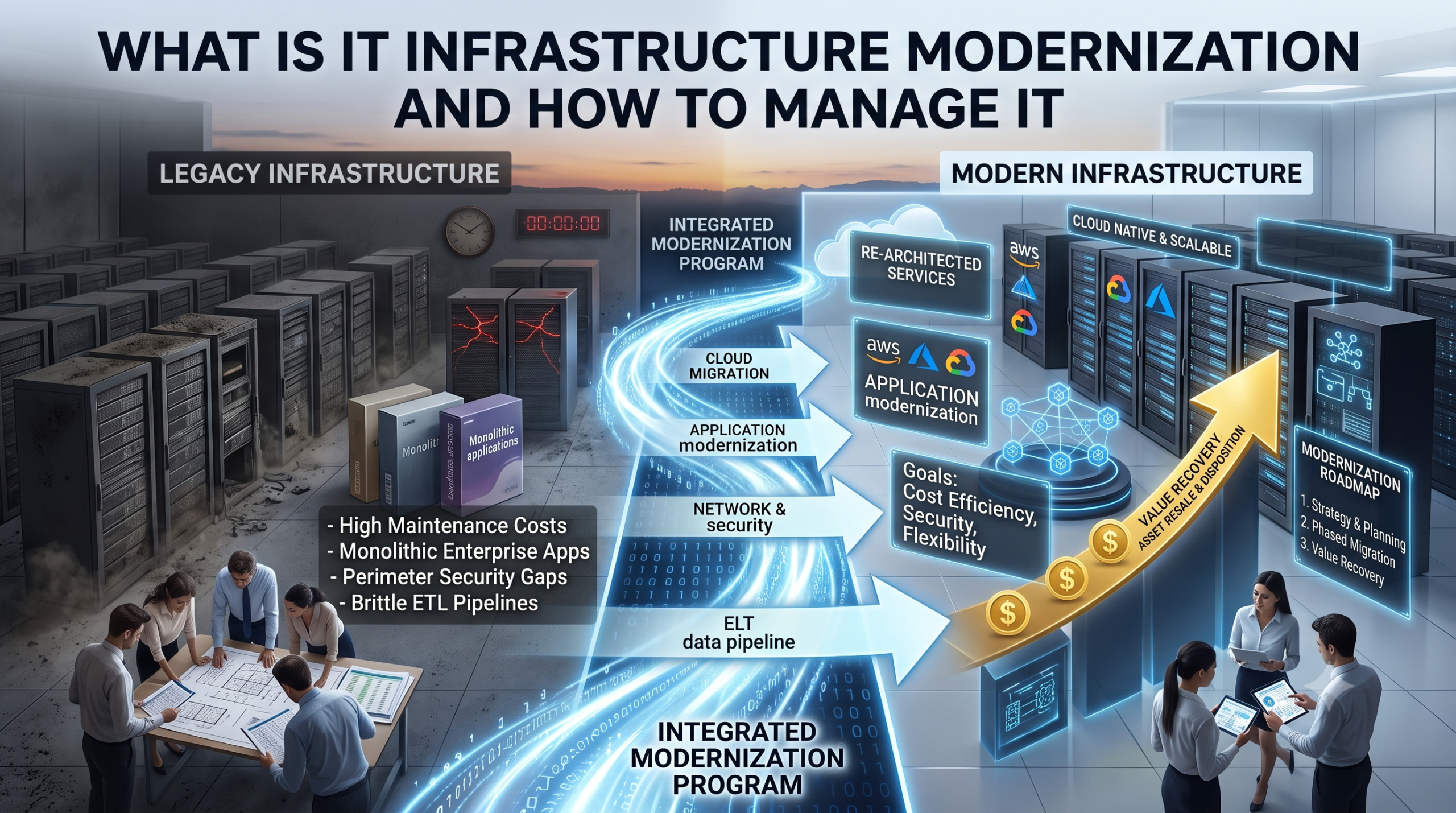
Trots vad den 30-sidiga rapporten vill få dig att tro är modernisering av IT-infrastrukturen ett enkelt begrepp. Det handlar om att ersätta den infrastruktur som ditt företag bygger på med något som är bättre anpassat för att driva verksamheten.
Utmaningarna ligger i att planera och genomföra ett smidigt moderniseringsprojekt med rätt tidsplan, teknikplattform och kostnad.
Konsekvenserna av att inte modernisera är påtagliga: äldre system blir dyrare att underhålla för varje år, begränsar vad man kan bygga vidare på dem och medför säkerhetsrisker på grund av bristande support. Konsekvenserna av en misslyckad modernisering är lika påtagliga. Projekt som försöker göra allt på en gång fastnar. Vid migreringar där inventeringsfasen hoppas över upptäcks beroenden mitt i genomförandet, vilket tvingar fram kostsamma omvägar.
En lyckad modernisering av IT-infrastrukturen hittar en balans mellan dessa mål och gör er IT-verksamhet mer kostnadseffektiv, säker och flexibel inför framtiden. Den tar hänsyn till allt från återvinning av värdet på IT-tillgångar till planering av driftstopp, och inga beslut fattas i hast. De bästa projekten utarbetas långt i förväg och anpassar verksamheten efter den ursprungliga planen.
Vad du behöver veta om modernisering av IT-infrastrukturen: Kortfattad information
- Moderniseringen av IT-infrastrukturen innebär att man ersätter äldre system (lokala servrar, batchbaserade datapipelines, monolitiska applikationer och föråldrad nätverksarkitektur) med molnbaserade, skalbara alternativ.
- Modernisering kan omfatta: migrering till molnet, modernisering av applikationer, nätverk samt modernisering av säkerheten och modernisering av datapipeline (övergången från ETL till ELT).
- Äldre infrastruktur är dyrare att underhålla än moderna alternativ, begränsar möjligheten att införa nya verktyg och medför säkerhetsrisker som den nuvarande generationens arkitektur hanterar på ett annat sätt.
- Varje moderniseringsprogram innebär att fysisk hårdvara byts ut. Servrar, lagringssystem, och nätverksutrustning som tas ur drift i samband med moderniseringen medför restvärde, skyldigheter avseende datasäkerhet samt krav på miljövänlig avfallshantering.
- Tidsfönstret för att återvinna värde från uttjänad hårdvara avslutas snabbare än vad de flesta IT-ekonomiavdelningar räknar med. Överbliven hårdvara som avyttras inom 60 till 90 dagar efter att den tagits ur drift ger ett betydligt högre återvinningsvärde än hårdvara som får vänta i sex månader medan organisationen slutför hela moderniseringsprojektet.
Varför moderniserar organisationer sin IT-infrastruktur, och vilka utmaningar medför det?
Moderniseringen av IT-infrastrukturen bör ske gradvis och planeras flera år i förväg. Det är det bästa scenariot. I verkligheten inleds diskussionen oftast först när något går sönder eller inte längre stöds.
Orsaken är oftast en av tre saker.
- Ett äldre system klarar inte av att stödja det nya verktyg som verksamheten behöver.
- Driftskostnaderna stiger till en nivå där de inte längre är motiverade, särskilt arbetskostnaderna för att hålla äldre system uppdaterade och i drift.
- En efterlevnadsgranskning belyser säkerhetsläget i en femton år gammal nätverksarkitektur, och någon i ledningen tar del av resultaten.
Du kan modernisera stegvis genom att bygga molnbaserade lösningar och integrera mikrotjänster i containrar i en skalbar infrastruktur, utan att behöva byta ut alla beprövade system på en gång.
Fyra komponenter som kännetecknar ett moderniseringsprogram för IT-infrastrukturen
Modernisering av IT-infrastrukturen är inte ett enskilt projekt. Det är en typ av arbete som sträcker sig över flera områden och ett stort antal avdelningar, där varje avdelning har sin egen tidsplan, sina egna leverantörer och sina egna tekniska krav. Ett verkligt moderniseringsprogram omfattar åtminstone dessa fyra aspekter, antingen i tur och ordning eller samtidigt.
- Molnmigrering: Detta är den mest uppenbara delen. Att flytta arbetsbelastningar från lokala datacenter till AWS, Azure eller GCP minskar behovet av att hantera fysisk hårdvara och ger teamen tillgång till elastisk datorkraft och lagring som skalar efter efterfrågan, istället för att kräva kapacitetsplanering flera år i förväg. Nackdelen är att en så kallad ”lift-and-shift”-migrering – det vill säga att köra samma äldre arkitektur i ett hyrt datacenter – nästan inte ger några fördelar alls. För att dra nytta av vad molninfrastrukturen faktiskt erbjuder måste man omstrukturera arkitekturen för den. Det innebär automatisk skalning, serverlös datorkraft och hanterade tjänster som tar över det operativa arbete som ditt team för närvarande sköter manuellt.
- Modernisering av applikationer: Denna aspekt handlar om den monolitiska programvaran som de flesta företagsmiljöer har byggt upp under årtionden. Monolitiska applikationer är svåra att uppdatera, svåra att skala och svåra att integrera med andra system. Genom att dela upp dem i mikrotjänster – mindre, självständigt driftsättbara tjänster – och placera dem i containrar kan man uppdatera en komponent utan att behöva röra de övriga. För IT- och datateam innebär detta också renare och mer tillgängliga data som är enklare att arbeta med i senare led.
- Modernisering av nätverk och säkerhet: Det här är den del som oftast skjuts upp och som medför störst risk när så sker. Den äldre nätverksarkitekturen utgick från att alla befann sig inom en perimetrisk gräns och hade åtkomst till samma lokala nätverk, men distribuerade team, molnbaserade arbetsbelastningar och fjärråtkomst kräver ett annat ramverk. SASE-arkitekturer (Secure Access Service Edge) kombinerar nätverk och säkerhet i ett enda ramverk som fungerar oavsett var användarna befinner sig. Zero-trust-modeller, som verifierar varje åtkomstförfrågan istället för att lita på något inom nätverksgränsen, har blivit standarden för organisationer som hanterar känslig data. Att modernisera säkerhetslagret är avgörande om du flyttar arbetsbelastningar till molnet.
- Modernisering av datapipeline är övergången från ETL till ELT. Traditionella ETL-pipelines (extract, transform, load) omvandlar data innan de laddas in i ett mål, vilket innebär att varje ändring av affärslogiken kräver att själva pipelinen modifieras. Det är en långsam och sårbar process som skapar flaskhalsar för alla team som är beroende av data. ELT (extract, load, transform) laddar först rådata till molnlagret och omvandlar den sedan med hjälp av SQL. Detta separerar datainläsningen från omvandlingen, minskar antalet fel i pipelinen och ger analytikerna större kontroll över omvandlingslagret.
| IT-infrastrukturkomponent | Vad det ersätter | Huvudsaklig fördel |
| Molnmigrering | Lokala servrar och datacenter | Elastisk skalbarhet, minskad hårdvarubelastning |
| Modernisering av applikationer | Monolitiska företagsapplikationer | Snabbare uppdateringar, renare datautmatning |
| Modernisering av nätverk och säkerhet | Perimeterbaserad äldre nätverksarkitektur | Zero-trust-åtkomst, stöd för distribuerad personalstyrka |
| Modernisering av datapipeline (från ETL till ELT) | ETL-pipelines för batchbearbetning | Realtidsdata, analytikerstyrd bearbetning |
Hur man tar fram en moderniseringsplan som inte fastnar
Det vanligaste felet vid modernisering av IT-infrastrukturen är att man tar sig vatten över huvudet. Projekt som försöker modernisera allt på en gång går i stå inom sex månader, överskrider budgeten och slutar med en ofullständig migrering som är svårare att hantera än den ursprungliga situationen.
Den praktiska vägen genom detta består av fyra steg.
Börja med en inventering
Dokumentera alla system, databaser, applikationer och pipeliner, samt beroendeförhållandena mellan dem. Du måste veta vilka tjänster som delar en databas, var en enskild felkälla skulle kunna få kedjeeffekter över flera team och hur dataflödena ser ut från källa till användning. Utvärderingarna får inte hoppa över några steg. Annars riskerar du att upptäcka beroenden mitt under migreringen som tvingar fram kostsamma omvägar.
Fastställ målen utifrån affärseffekten, inte utifrån teknikkategorin.
Om ditt största problem är att rapporterna alltid ligger en dag efter, hamnar moderniseringen av datapipeline i realtid högst upp på listan. Om efterlevnad är den främsta utmaningen, kommer moderniseringen av nätverk och säkerhet i första hand. Prioriteringsordningen bör styras av vad verksamheten behöver mest akut, inte av vad som tekniskt sett är enklast att modernisera först. Sätt upp mätbara mål för varje fas, inklusive fördröjning vid sökningar, svarstid vid incidenter och infrastrukturkostnad per arbetsbelastning.
Välj teknik utifrån hur väl den passar in i systemet, inte utifrån vilken leverantör du föredrar.
Ett vanligt misstag är att välja en molnleverantör eller en plattform och sedan försöka anpassa resten av teknikstacken efter den. Fråga hur väl en viss teknik integreras med det du redan har, hur de långsiktiga driftskostnaderna ser ut när migrationsentusiasmen har lagt sig, och hur det påverkar ditt teams tekniska omkostnader över tid. En helt hanterad infrastruktur med löpande betalning passar de flesta användningsfall och tar bort hela bördan med kapacitetsplanering.
Kör gamla och nya system parallellt under migreringen.
Innan någon övergång genomförs bör du kontrollera att den nya infrastrukturen hanterar produktionsbelastningarna korrekt genom att köra den parallellt med det befintliga systemet. Börja med system som innebär lägre risk. Skapa förtroende innan du rör något som är affärskritiskt. Ha en återställningsplan för varje fas.
3 utmaningar som bromsar IT-moderniseringen – och hur man hanterar dem
Varje moderniseringsprogram stöter på motstånd. De som lyckas är de som har planerat för detta, istället för att låta sig överraskas av det.
- Beroenden i äldre system. Äldre system är den vanligaste orsaken till förseningar mitt under migreringen. Äldre system är djupt integrerade i affärskritiska arbetsflöden, och kopplingarna mellan dem är ofta odokumenterade. Man upptäcker dem först när något slutar fungera efter att man redan har bytt system. Inventeringsfasen finns just för att identifiera dessa problem innan migreringen påbörjas.
- Kompetensbrister. Brist på kompetens i teamet är en berättigad oro, och det är lätt att underskatta problemet. Molnbaserad arkitektur, containerisering, Kubernetes och moderna dataplattformar kräver kompetens som de flesta IT-team endast har i fragmenterad form snarare än på djupet. Att rekrytera personal med dessa kompetenser tar tid och konkurrerar direkt med det operativa arbetet med att hålla befintliga system igång. De organisationer som hanterar detta bäst ser utbildning som ett parallellt arbetsflöde och tar in extern expertis, särskilt under planeringsfasen.
- Kostnadshantering under övergångsperioden. Alla företag drabbas av oväntade kostnader. Modernisering är tänkt att sänka kostnaderna, så det är svårt att svälja att se IT-budgeten svälla. Övergångsperioden i sig är kostsam, men de långsiktiga besparingarna är verkliga och kan beräknas. Att driva parallella system, betala för molnresurser samtidigt som man fortfarande underhåller lokal hårdvara och hantera produktivitetsförlusterna under övergången – allt detta summerar sig. Budgetera övergången separat från driftskostnaderna i måltillståndet och fastställ en tydlig tidsplan för avvecklingen av den gamla miljön, istället för att låta den vara igång på obestämd tid som ett säkerhetsnät. Detta ger dig också maximal avkastning på IT-tillgångarna i den gamla miljön.
Hantera kostnaderna för modernisering av IT-infrastrukturen genom återförsäljning av IT-tillgångar
Moderniseringen av IT-infrastrukturen leder till att fysisk hårdvara som inte längre tillverkas blir överflödig. När ni migrerar 60% av era arbetsbelastningar till molnet och minskar er lokala infrastruktur från fyra datahallar till en, uppstår ett avyttringsärende. Hundratals eller tusentals servrar, lagringsenheter och nätverksenheter som måste dokumenteras, rensas och hanteras på ett sätt som säkerställer att deras återstående värde tillvaratas och att dina efterlevnadskrav uppfylls.
Precis som resten av projektet kräver avyttringen och återvinningen av tillgångarna planering redan från början.
Företagshårdvara förlorar inte hela sitt värde när den lämnar ditt datacenter. De verkliga förlusterna uppstår när man låter användbara tillgångar stå oanvända i ett lager. Till exempel en Dell PowerEdge R750 eller en HPE ProLiant DL380 det var i mitten av livscykeln vid inledningen av ert moderniseringsprogram har fortfarande ett betydande andrahandsvärde. Er plan för regelefterlevnad kräver samma noggranna planering och tidsplanering.
Den hårdvara som fasas ut inom ramen för ert moderniseringsprogram utgör en säkerhetsrisk, men det är mer än så. Om ni hanterar hårdvaran på rätt sätt är den en tillgång som kan återvinnas.
Vill du veta hur exIT hanterar avyttring av hårdvara i stor skala inom moderniseringsprogram? Börja här.

 Swedish
  English
  German
  Spanish
  French
  Dutch
Dutch