

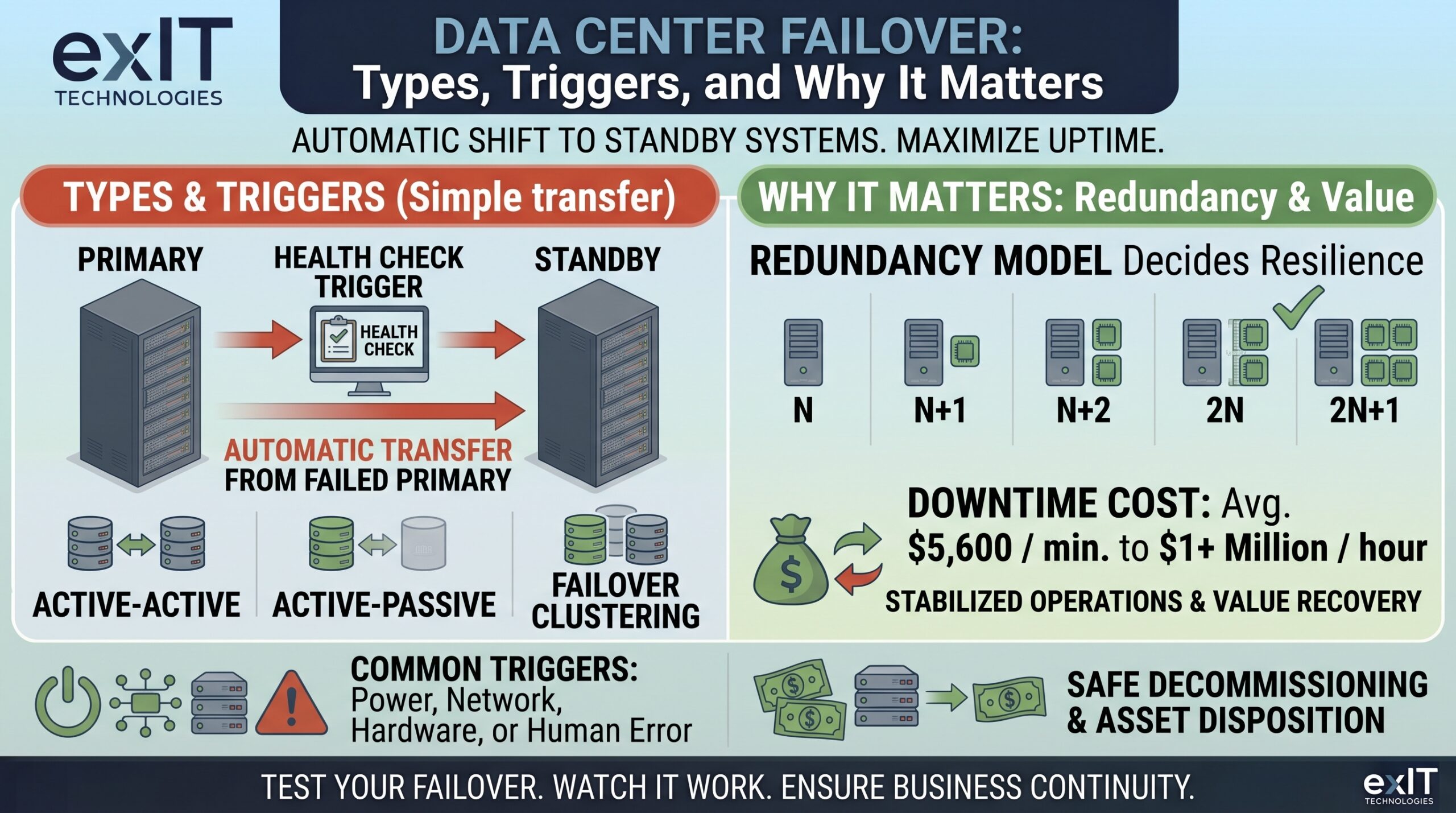
Data center teams should be able to diagram their failover architecture from memory.
However, not many teams can tell you when it last actually triggered. That’s because the standby path hasn’t been tested since the day it was installed.
A failover system can’t just exist on paper. The only way to know whether your redundancy actually holds is to watch it work under real failure conditions, and most teams never do that until the day they have no choice.
Fast Facts: What You Need to Know About Data Center Failover
- Data center failover automatically shifts your workloads from a failed system to a standby one.
- The three most common configurations are active-active, active-passive, and failover clustering.
- The redundancy model underneath your failover setup (N, N+1, N+2, 2N, or 2N+1) determines whether it actually holds up under a real failure or just looks good in an architecture diagram.
- Failover triggers on specific events instead of a schedule. Hardware failure, power loss, network partition, or planned maintenance are all common events.
- Downtime is more expensive than you may think. Gartner has pegged the average cost at $5,600 per minute, and ITIC’s research shows some enterprises put an hour of downtime north of $1 million.
What Counts As A Data Center Failover, And What Doesn’t
Failover is the automatic handoff of workloads, systems, or applications from your primary system to a standby one when the primary becomes unavailable. It’s easy to mix up failover with a few other concepts, like a switchover.
Switchover looks similar but isn’t automatic. Someone or something has to manually initiate the handoff, which almost always introduces a short window of downtime that automatic failover is built to avoid.
Failback is the return trip. Once your primary system is repaired and verified, workloads shift back from the standby to the original system.
Load balancing distributes traffic across multiple healthy systems at the same time. Failover only activates a backup when something breaks.
Within the failover itself, two configurations dominate your options.
Active-active setup: Two or more nodes run the same workload simultaneously, splitting the load and improving throughput, so if one node drops out the others simply absorb its share.
Active-passive setup: A standby node sits idle, monitoring the active node’s health, and only takes over when the active node fails.
A third approach, called Failover clustering, groups two or more physical or virtual servers so that if one node fails, another assumes its workload automatically. That’s how most teams achieve high availability at the application layer without redesigning the whole environment.
What Actually Happens During A Failover Event
Failover runs on continuous health checks. A monitoring mechanism, sometimes literally called a heartbeat, tracks whether your primary system is responding.
When that heartbeat stops or a health check fails, the failover system triggers automatically. Traffic and workloads redirect to the standby system, which has typically already been synced to the same state as the primary, minimizing data loss.
Once the standby system is live, it operates as the primary until the original is repaired and verified. At that point, failback moves the workload back, ideally as a controlled process rather than an emergency one.
The part that separates working failover from failover that only works in theory is testing. A tested failover path has already proven it can complete this sequence under real conditions. An untested one is an untested hypothesis about how your infrastructure will behave, and the worst possible moment to find out you were wrong is the moment you actually need it.
Why the Redundancy Model Underneath Failover Decides Whether It Holds
Failover is only as good as the redundant infrastructure supporting it. That’s measured in redundancy tiers: N, N+1, N+2, 2N, and 2N+1.
N is the baseline: It’s the minimum capacity required to run your facility at full load, with zero spare components. An N-only design has no failover cushion, so any component failure becomes an outage.
N+1 adds one component: This tier goes one step beyond what’s needed for full capacity, enough to absorb a single failure or take one unit offline for maintenance.
N+2 adds two: This is the next tier up, and it buys protection against simultaneous failures.
2N doubles the entire system: With this tier in place, you’re running a fully redundant mirror of your primary infrastructure so either half can carry the full load alone.
2N+1 adds one more component: This tier adds another layer on top of that full duplication. It’s typically reserved for facilities that can’t tolerate even a brief service interruption and can justify paying for it.
These tiers roughly track Uptime Institute’s Tier Classification System, which certifies facilities on a similar scale:
| Niveau | Redondance | Annual Downtime Allowance |
| Niveau I | N | ~28.8 hours |
| Niveau II | N+1 | ~22 hours |
| Niveau III | Concurrently maintainable (roughly N+1 to 2N) | ~1.6 hours |
| Niveau IV | 2N ou 2N+1 | ~26.3 minutes |
When Does Failover Actually Trigger?
Failover doesn’t run on a maintenance calendar. It fires in response to specific failure conditions, and the split between them tells you where to focus your attention.
Power issues remain one of the largest categories of significant outages, with UPS failures the single biggest driver within that category, but networking problems and hardware failure are significant contributors as well
Then there’s the trigger nobody likes to name in the postmortem: people. Uptime Institute’s 2025 report found that close to 40% of organizations suffered a major outage tied to human error over the past three years, and the share of those incidents caused specifically by staff not following established procedure has been climbing.
No amount of 2N infrastructure can prevent an outage if the people in the room don’t follow the runbook.
Planned maintenance is the trigger that’s actually good news, since it’s the one you can schedule, test, and walk back cleanly if something goes wrong.
How Improper Failovers Can Cost You
The number that gets quoted most often is Gartner’s estimate that downtime costs an average of $5,600 per minute across organizations, though the range underneath that average is wide. ITIC’s Hourly Cost of Downtime enquête found that roughly 40% of enterprises put an hour of downtime between $1 million and $5 million, not counting legal exposure, regulatory fines, or the customers who don’t come back.
Those numbers assume failover works when called on. When it doesn’t, there could be lots of culprits: the standby was misconfigured, the sync lagged, or nobody had tested the cutover since the last hardware refresh.
The failover architecture on your current diagram was probably designed around hardware that’s now a few refresh cycles old. Proper failover is what keeps that hardware from becoming a single point of failure while it’s still running.
What happens to it once it’s finally retired is a separate problem, with its own chain-of-custody and data security requirements. When that redundant hardware reaches end of life, Services de démantèlement de centres de données proposés par exIT handle the removal, certified data destruction, and audit-ready reporting for every asset that used to be part of your redundancy plan, and our ITAD process recovers whatever residual value is left in it.

 French
  English
  German
  Spanish
  Swedish
  Dutch
Dutch