

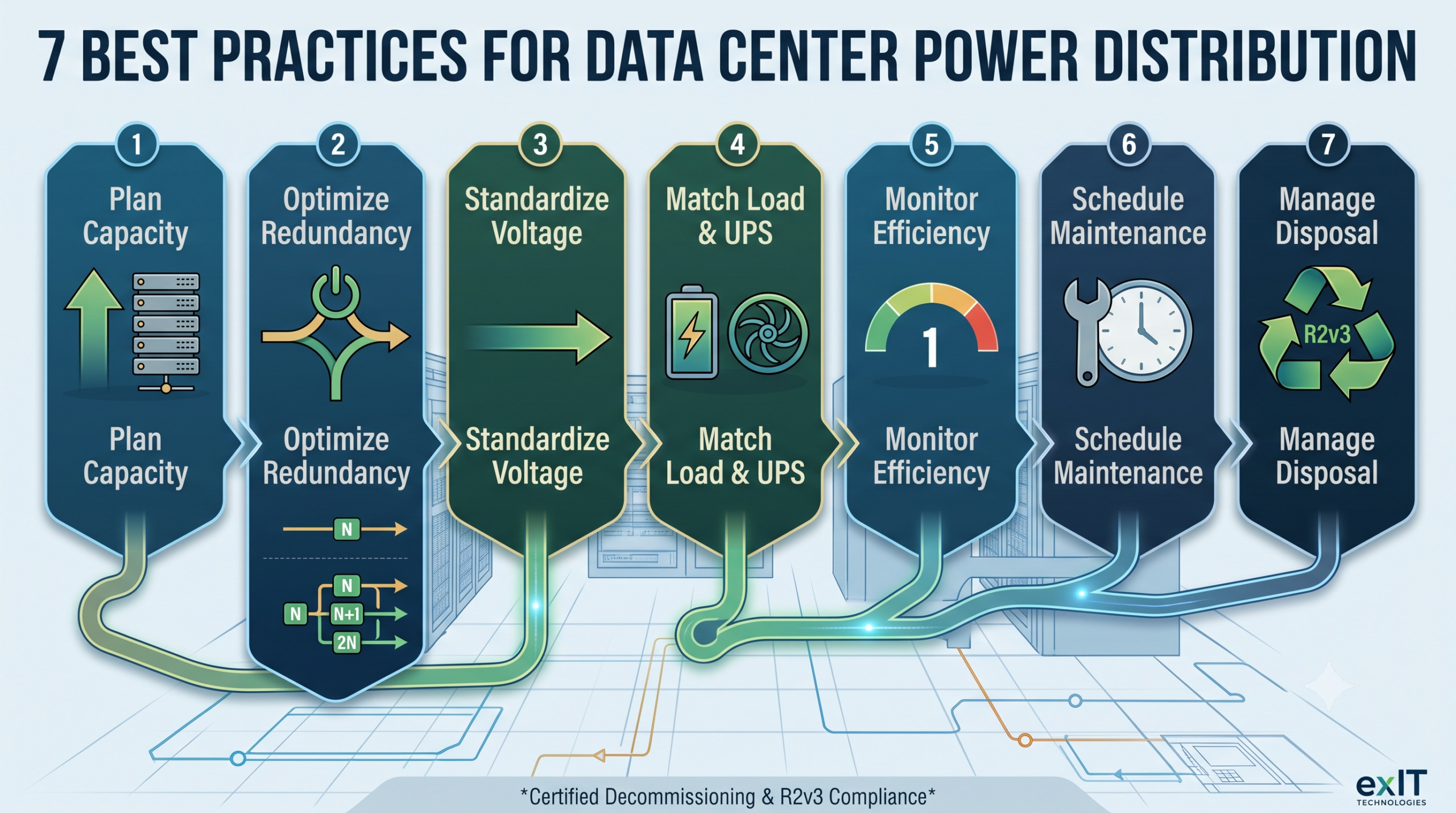
Your rack density has tripled in three years. Your power distribution architecture hasn’t kept pace with it.
Generators and UPS units get the attention because they’re visible and dramatic when they fail. The real risk usually sits in the distribution path between them: the voltage architecture, the redundancy design, the equipment specifications.
Power distribution is critical to the entire chain from the utility connection to the rack, transformers, switchgear, Uninterruptible Power Supply (UPS) systems, PDUs, and the pathways connecting all of it. Getting that chain right determines whether a facility can absorb growth in rack density (particularly the density increases driving AI and HPC deployments) or whether it becomes the bottleneck that stalls everything else.
Fast Facts: What To Know About Data Center Power Distribution
- Plan power capacity with real headroom, not just enough for today’s load. Facilities that don’t build in spare capacity and modular scalability hit a wall the first time IT load grows faster than expected.
- Match your redundancy design to what the business actually needs. Concurrently maintainable architectures (Tier III and above, per the Uptime Institute’s framework) cost more upfront but let you service equipment without a full shutdown.
- Voltage architecture decisions compound over the life of a facility. Distributing power at 400V instead of stepping down to 208V or 120V cuts transmission losses by roughly 2 to 5 percent, and that math gets more relevant as rack density climbs.
- UPS topology and energy storage chemistry should be chosen for the load you’re protecting. Don’t default to whatever was specified last time.
- Real-time monitoring across every major distribution component, not just the generator and the UPS, is what turns maintenance from reactive to predictive.
1. Plan For The Load You Don’t Have Yet
Every power distribution design starts with an estimate of current load. It would be a mistake to stop there.
A distribution system sized exactly to today’s IT load has no room for the next expansion, and retrofitting capacity into an existing system, new transformers, new busway runs, new switchgear is far more disruptive and expensive than building in headroom from the start.
Good practice involves rating major equipment like transformers and generators for the facility’s planned end-state, or at least an idea of what that could be, with 10-20 percent of spare capacity built in on top of that. It also means reserving physical space and oversizing cable pathways, trays, busways, conduits, so future capacity additions don’t require ripping out what’s already installed.
Phased deployment helps here too. Rather than building an entire facility’s power infrastructure at once, deploy in stages to let each phase get populated and generate revenue while the next phase is still being planned. This way you don’t force a choice between overbuilding capacity nobody’s using yet and underbuilding capacity you’ll need in eighteen months.
Ask yourself: what does your current distribution design assume about the load you’ll be running three years from now?
2. Size Redundancy To What The Business Actually Needs, Not What’s Cheapest To Build
Redundancy tiers exist because different facilities have genuinely different tolerance for downtime, and building more redundancy than you need wastes capital. Building less than you need risks the business. Uptime Institute uses this framework:
| Nivel | Redundancy | Concurrently Maintainable | Typical Annual Downtime |
| Tier I | N (no redundancy) | No | 28.8 hours |
| Tier II | N+1 | No | 22 hours |
| Tier III | N+1, multiple active paths | Sí | 1.6 hours |
| Tier IV | 2N or 2N+1 | Sí | 26.3 minutes |
The practical difference between these tiers isn’t just uptime percentage. Tier I and II designs require a full shutdown of IT operations for planned maintenance, which means every component swap becomes a scheduled outage. Tier III and above let any component get serviced or replaced without touching the load, because the design includes multiple independent, active power paths.
Assess this with a pragmatic mindset. Don’t default to whatever tier your last facility used. A Tier II design might be entirely appropriate for a secondary office data closet and completely wrong for a facility running mission-critical financial transactions. Match the tier to the actual cost of downtime, not to habit.
3. Get The Voltage Architecture Right Before You Lock In Equipment
Voltage architecture decisions get made once, early on. The facility then lives those decisions for a decade or more. That makes them worth more scrutiny than they usually get.
The efficiency math is concrete. Running power to the rack at 400V instead of stepping down to 208V eliminates a conversion stage, and that alone reduces energy costs by roughly 2 to 3 percent compared with 208V distribution, and 4 to 5 percent compared with 120V distribution.
Higher voltage also means lower current for the same load, which reduces the copper needed for cabling and cuts resistive losses along the way. The tradeoff is that every voltage transformation stage you add, stepping 480V down to 208V down to 120V, for example, adds its own loss and its own point of failure. Minimizing the number of transformation stages and standardizing voltage consistently across the facility simplifies both spare-parts management and maintenance down the line.
If your facility is planning for higher-density racks, particularly GPU-heavy deployments, this is the moment to revisit voltage architecture. Don’t default to whatever the last build used.
4. Choose UPS Topology And Energy Storage For The Load You’re Actually Protecting
Not every load needs the same level of power protection, and treating UPS selection as a single, uniform decision leaves either money or resilience on the table.
Standby and line-interactive UPS designs are lower cost and adequate for less critical loads, but they carry a brief transfer time (a few milliseconds) when switching to battery. Double-conversion UPS systems eliminate that transfer gap entirely by continuously powering the load from the inverter. This is why they’re the standard for mission-critical server environments despite lower efficiency and higher cost.
Energy storage chemistry matters just as much as topology. Valve-regulated lead-acid batteries remain the most common choice, but lithium-ion is gaining ground for its smaller footprint and built-in cell monitoring. Lithium-ion comes at the cost of a higher fire risk from thermal runaway that makes separate, ventilated storage a sensible precaution. Flywheel storage is a third option worth knowing about: it’s eco-friendly and highly efficient, but it only bridges 15 seconds to 15 minutes of power. That limits it to pairing with fast-start generators rather than replacing battery storage outright.
Match the topology and chemistry to the criticality of what’s plugged in, rather than standardizing on one UPS spec across every rack in the building.
5. Monitor Every Major Component, Not Just The Ones That Get The Attention
Active monitoring on transformers, switchgear, and circuit breakers is what turns a maintenance program from reactive to predictive. Smart low-voltage breakers and sensors on switchgear can capture voltage, current, and power factor data continuously, and that data helps you catch a developing fault before it becomes an outage.
Phase balancing is a specific, common failure you need to keep in mind. Uneven load distribution across the three phases of a circuit can overload a neutral wire and introduce harmonics long before it trips a breaker.
A data center infrastructure management (DCIM) platform ties this monitoring together into something usable: a single interface for inventory, status, maintenance history, and reporting across every distribution component in the facility. Power usage effectiveness (PUE), the ratio of total facility power to power actually reaching IT equipment, is the most common metric DCIM tracks. PUE in a moment shows how efficiently the facility is operating, with the goal of getting as close to 1 as possible. Data center operators can also track the PUE over time to track any issues with power efficiency.
6. Put Preventive Maintenance In Writing
A structured maintenance program with a written schedule for generators, UPS systems, transformers, and batteries beats an informal, institutional-knowledge approach every time.
Thermographic inspections catch abnormal heat signatures in cables, busbars, and connections before they become visible failures. Ideally you’d complete these every six months.
Load banks let you test generators and UPS systems under realistic conditions rather than assuming they’ll perform when a real outage arrives.
These steps will cost extra, but they’re cheap relative to the cost of experiencing an outage and realizing in that moment that the backup system doesn’t work.
Documentation matters as much as the testing itself. A maintenance log that’s actually current, and actually accessible to whoever’s on call, is the difference between a known issue getting addressed on schedule and a known issue turning into an unplanned outage six months later.
7. Plan To Retire Legacy Equipment Deliberately
A transformer, UPS bank, or busway run installed under an older voltage architecture or an outdated redundancy design doesn’t just disappear when the new equipment goes in. It has to come out, and how it comes out is still part of the power distribution decision, not a separate problem for someone else to handle later.
Retired UPS batteries in particular deserve attention here. VRLA and lithium-ion batteries are classified as Focus Materials under the R2v3 Standard, which means their handling and downstream processing carry the same kind of compliance requirements as other regulated electronics, not generic scrap. Equipment coming out in working condition (PDUs, ATS units, switchgear) also frequently retains resale value more than operators think.
Build the removal and disposition plan into the same design conversation as the new installation, and you’ll avoid leaving significant resale value on the table.
Planning Power Distribution With The Full Lifecycle In Mind
Reliable power distribution requires more than one good decision. It represents a chain of problems you need to navigate carefully.
- Capacity planning
- Redundancy design
- Voltage architecture
- Equipment selection
- Monitoring, maintenance
- Hardware retirement
Get any one link wrong and the rest of the design is compensating for it.
If you want to learn more about how to handle the responsible retirement and value recovery of your retired equipment, exIT Technologies handles that side of data center decommissioning, from certified data destruction to R2v3-compliant recycling and asset recovery reporting.

 Spanish
  English
  German
  French
  Swedish
  Dutch
Dutch